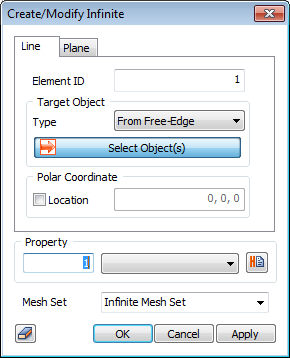
 It
is divided into ‘Line, and ‘Plane’ tab according to the
type. For the adjacent element with infinite element,
analysis is only for Quad / Wedge / Hexa typed Low/High
order element with 'Plane Strain / Axisymmetric / Solid'
property. It
is divided into ‘Line, and ‘Plane’ tab according to the
type. For the adjacent element with infinite element,
analysis is only for Quad / Wedge / Hexa typed Low/High
order element with 'Plane Strain / Axisymmetric / Solid'
property.
Target
Object Type : Infinite element can be created by
selecting 2D element, ‘Free Edge’ in the case of 'Line'
type. Infinite element can be created by selecting 3D
element, ‘Free Face’ in the case of 'Plane' type.
Property
: Select Line/Plane type infinite element
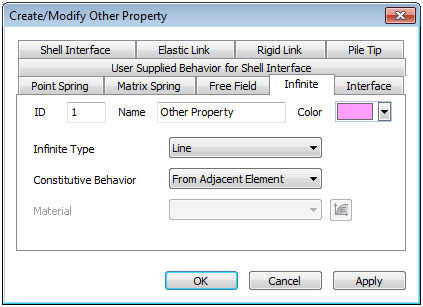
Infinite
Type : Select infinite element type. It is divided
into ‘Line’ type and ‘Plane’ type for 2D model and 3D
model respectively.
Constitutive
Behavior : Select Constitutive Behavior of infinite
element. It is divided into ‘From Adjacent Element’ type
which adopt material property of adjacent element and
‘User Defined’ type which can assign other material property
for only infinite element. ‘Material’ is directly inputted
for only 'User Defined' type.
|


